eFootball Mobile Controller Setup Guide for Sharper Control
Nomadnest28 Your thumbs slip mid-tackle, a pass fires in the wrong direction, and the match slips away — sound familiar? Touch controls have a ceiling, and a lot of mobile players hit it without realizing a controller could fix it.
This guide walks through the eFootball Mobile controller setup process from pairing to fine-tuning, so you understand what works today, what’s still limited, and how to avoid a clunky first impression.
What Is eFootball Mobile Controller Setup?
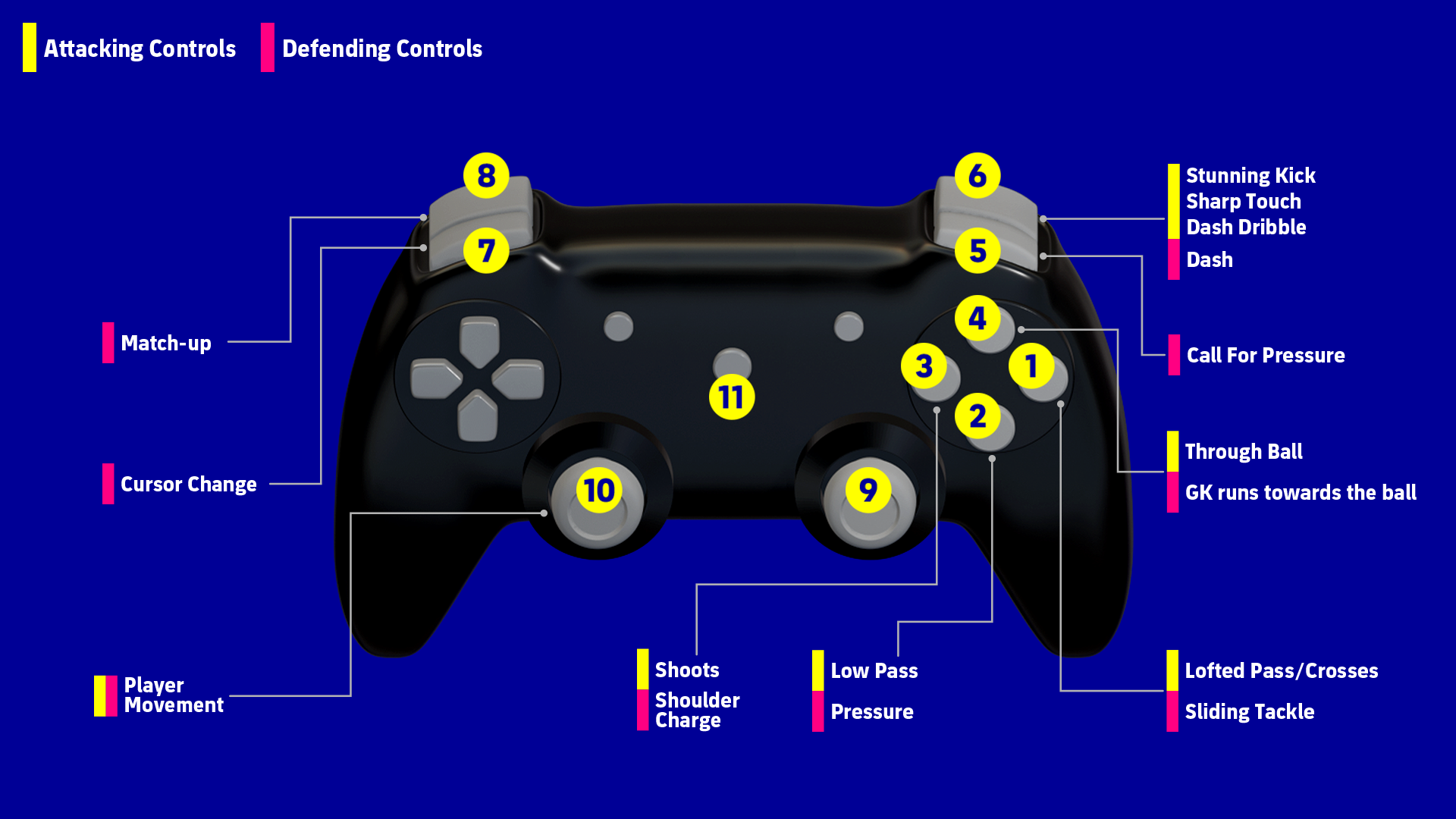
It means connecting a physical gamepad to your device and adjusting its response settings so gameplay feels closer to console than touchscreen. Konami rolled this feature out specifically to close the precision gap mobile players had compared to console users.
The exact pairing steps shift depending on your hardware. A PlayStation pad pairs by holding PS together with Create or Share until its light flashes, whereas an Xbox controller uses its own dedicated pairing button near the top edge. Generic Bluetooth pads generally follow the same pattern without needing a companion app. Think of it less like installing new hardware and more like connecting wireless earbuds — a short handshake, then it just works.
Benefits of a Proper Controller Setup
- Cleaner input timing – analog sticks respond with less delay than finger taps
- Fewer accidental touches – dedicated buttons remove screen-fumbling errors
- More natural shooting – trigger pressure mimics real power control better than tapping
- Console-like comfort – casting to a TV alongside a controller closes the gap with console play
Investing time in setup now matters given that competitive controller support is still expanding, so early practice puts you ahead once it fully arrives.
Real Testing Insights
Spending several sessions tuning joystick type and sensitivity revealed clear patterns:
- Switching from a fixed to a movable joystick cut down on stray directional inputs
- Landing sensitivity near 60% with roughly a 10% dead zone reduced accidental diagonal passes
- Shot timing became easier to judge consistently compared to rushed on-screen taps
This reinforced my view that a dialed-in controller setup delivers a measurable edge over default touch settings. Missed through balls and mistimed shots dropped noticeably once sensitivity was calibrated, compared to the frequent misfires from fast touchscreen tapping under pressure.
Steps to Configure Your Controller
- Turn on Bluetooth and switch your controller into pairing mode
- Complete the pairing handshake using your device’s specific button sequence
- Launch eFootball Mobile and verify the game recognizes your controller input
- Fine-tune sensitivity, dead zone, and camera settings before entering a match
Risks to Watch For
Expecting full ranked functionality leads to disappointment, since controller support is currently restricted to AI-controlled modes only — treat it as practice-mode territory for now. Leaving sensitivity on default settings often produces stray or inaccurate passes — adjust it manually instead. Jumping straight into competitive play without a warm-up wastes your early adjustment period — calibrate in practice matches first.
Tips for Getting the Most Out of Your Setup
- Favor a movable stick over a fixed one for better long-session comfort
- Moderate your sprint sensitivity so tackles don’t overshoot their target
- Screenshot your ideal settings, since updates can occasionally reset them
- Keep an eye on Konami’s patch notes, since controller functionality keeps expanding
FAQ
01. Can I use a controller in eFootball Mobile ranked matches?
Not currently — controller input only works in AI-controlled modes, with PvP support expected in a future update.
02. What controllers are compatible with eFootball Mobile?
PlayStation, Xbox, and most generic Bluetooth controllers pair successfully without needing extra software.
03. What’s a good starting sensitivity for eFootball Mobile controller setup?
Around 55-70% with a roughly 10% dead zone offers a stable baseline before adjusting to personal preference.
Conclusion
An eFootball Mobile controller setup gives players cleaner input timing, fewer accidental touches, and more natural shot control, making it worth the small time investment even while PvP support is still rolling out. For best results, calibrate sensitivity and dead zone during AI matches before relying on it competitively.